The "Waves" feature has been integrated directly into the Studio > Pipelines workflow. This update simplifies the management of longitudinal research and trackers. Waves allow you to manage recurring studies within a single, streamlined workflow.
How is this different from the Parent-Child approach? In the traditional Parent-Child setup, researchers manage longitudinal studies by maintaining a Parent study and creating separate Child studies for each fieldwork period (e.g. Jan 2026, Feb 2026). Each Child study is scripted independently, keeping each time period's data structurally isolated — while still allowing data to be downloaded at a master level through the Parent study. Waves consolidate this into a single study. Instead of creating new Child studies for each period, you simply add a new wave within the same pipeline. The script and pipeline settings carry forward automatically, reducing manual setup while keeping each wave's data segmented for analysis. *Note: If your tracking study requires strict script isolation between time periods — such as adding new questions that should not affect earlier waves — discuss your setup with your Milieu representative, as some scenarios may still benefit from the Parent-Child approach. |
TABLE OF CONTENTS
- 1. Step-by-Step Set-up
- 2. Managing Fieldwork & Quotas
- 3. Data Structure & Script Changes
- 4. Monitoring Your Progress
- 5. Current Feature Limitation
1. Step-by-Step Set-up
Setting up Waves follows a specific linear logic. To ensure your study remains automated and connected, follow this sequence:
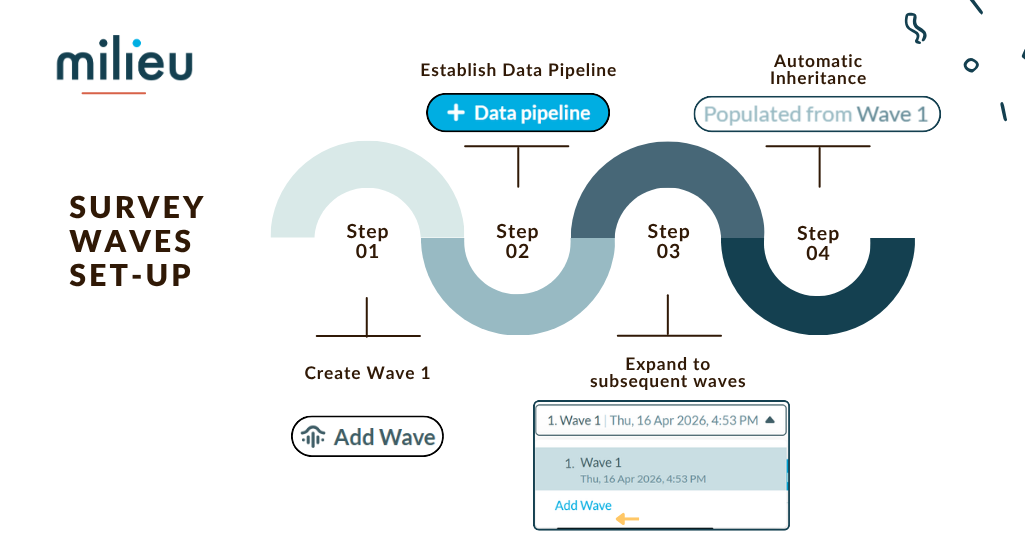
Create Wave 1: Initiate your study within the Studio Pipeline.
Establish Data Pipelines: Add your data pipeline (distribution) specifically in Wave 1.
Expand to Subsequent Waves: Only once the pipeline is set should you add Wave 2 and beyond.
Automatic Carry-Over: The system will automatically carry the pipeline settings forward into each new wave.
Important
|
2. Managing Fieldwork & Quotas
The Transition Protocol
Timing is everything when moving between iterations.
The "Start" Trigger: A wave officially ends when the next wave starts, not simply when it is created. This allows you to set up and configure your next wave in the background while the current wave is still finishing up in the field.
The Cut-off: Once the new wave is launched, the previous wave fieldwork stops immediately and cannot be restarted.
Quota Reset & Real-time Changes
Fresh Starts: Quota tracking resets completely for every new wave. You start from zero for each iteration.
Mid-Fieldwork Adjustments: If you need to change a quota while a wave is active, the script will adapt to those changes and apply to subsequent responses.
Historical Integrity: Any changes made to active quotas do not retroactively affect previous waves; those remain locked as "snapshots."
3. Data Structure & Script Changes
One of the most powerful features of Waves is the ability for the dataset to evolve while remaining segmented by wave.
Script Adaptation: If you update a question in a subsequent wave, the changes apply to new responses collected in that wave.
Wave-Based Segmentation: Each response is tied to its respective wave, allowing you to analyse data across waves while preserving the structure of each fieldwork period.
Pipeline Mapping: These changes are reflected automatically in the exported dataset. The pipeline handles the transition, ensuring your export includes the updated question structure.
4. Monitoring Your Progress
It is important to note that the Monitor dashboard in Studio provides a segmented view rather than one long continuous line.
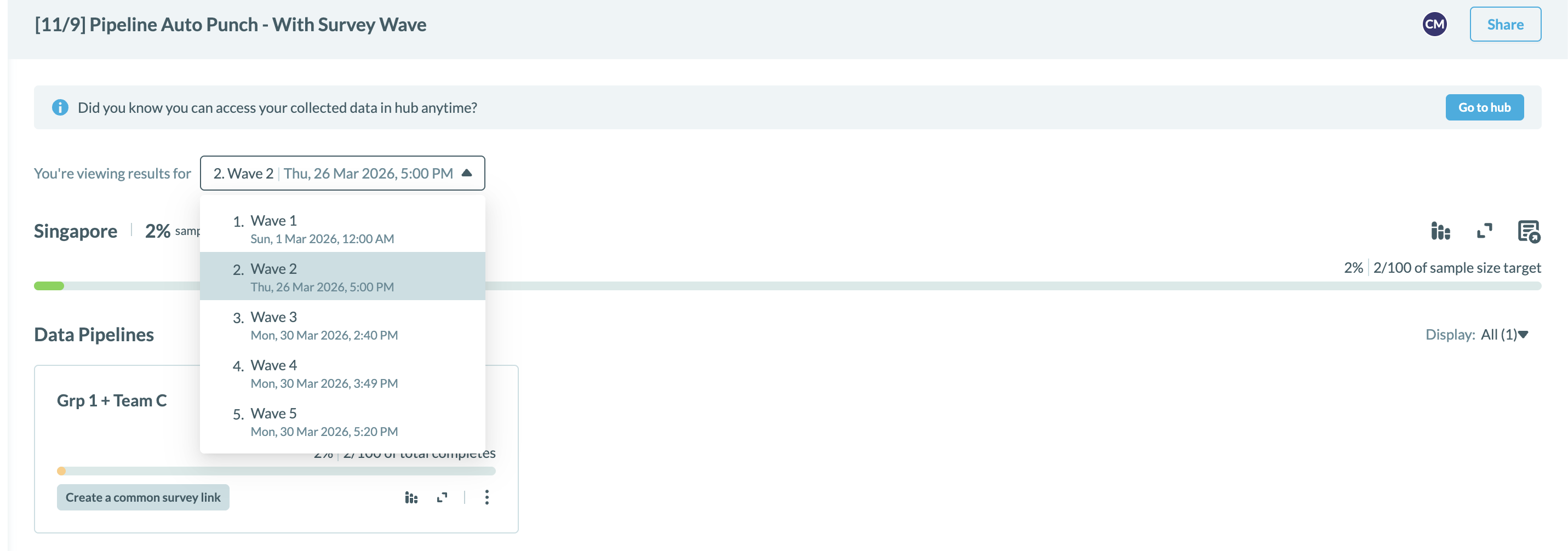
The Active Wave: Displayed at the very top of the page with full, detailed metrics.
Completed Waves: These are stored as "snapshots" below the active wave.
Limited Historical Detail: These snapshots display final collection totals only. You will not be able to see granular day-by-day or month-by-month breakdowns for waves that have already been closed.
5. Current Feature Limitation
- Sample Exclusion: As of April 2026, you cannot exclude specific respondents when setting up new waves.
- Best Use Case: Because of this, the Waves feature is currently recommended for tracker studies that do not require sample lockouts/exclusion.
*Note:
- For more information on respondent re-eligibility behaviour, click on this article.
- If your study requires sample exclusion, contact your Milieu representative to discuss alternative setups.
Was this article helpful?
That’s Great!
Thank you for your feedback
Sorry! We couldn't be helpful
Thank you for your feedback
Feedback sent
We appreciate your effort and will try to fix the article