Individuals whom you have sent surveys to via email have the option to unsubscribe from the audience group/ mailing list they fall within. This is in compliance to the PDPA laws and policies that are in effect to ensure individuals' personal data and information are protected and safe guarded.
Respondents having a choice to unsubscribe from an audience group
- Respondents to your survey can unsubscribe from your audience group/ mailiing list through the 'unsubscribe' button in the survey invite email they receive. (*Note: this feature only applies to distributing surveys via email)
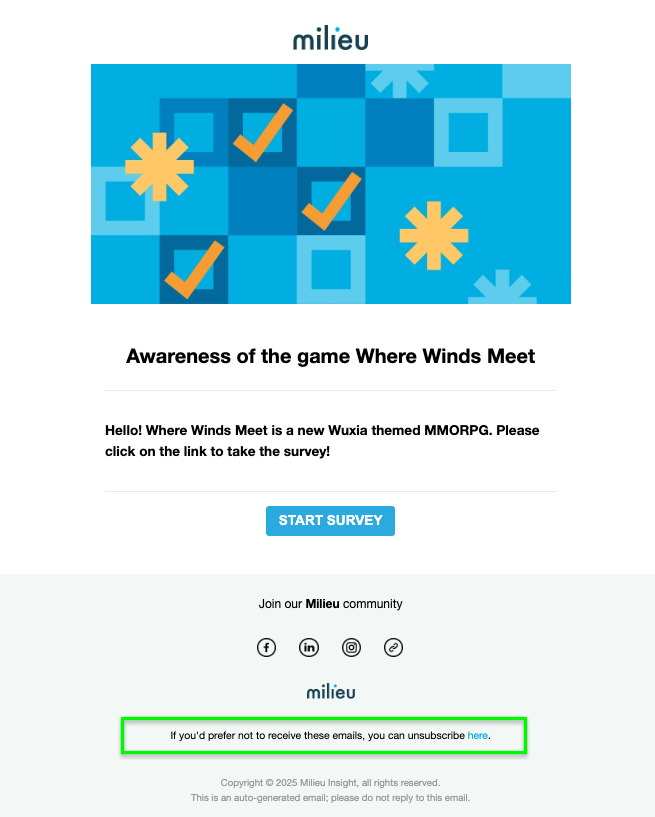
- Upon confirmation of their choice to unsubscribe:
- Respondents will not be sent any reminder emails to attempt the survey
- Respondents will not receive any future surveys sent to the same audience group/ mailing list
How do I tell if the respondent(s) are unsubscribed from my audience group/ mailing list?
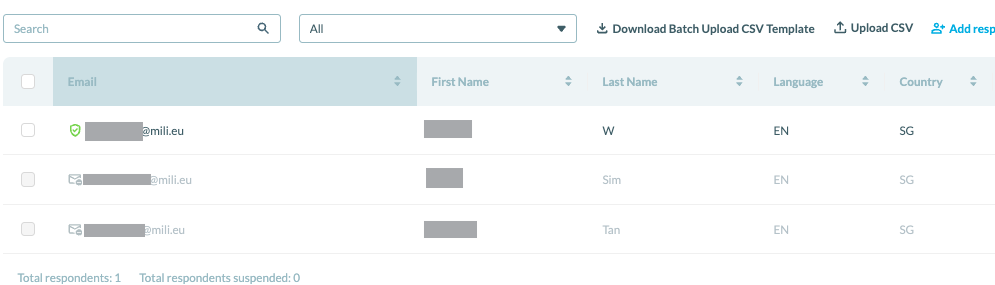
- To view the status of your respondent(s), go to Audience Group Management > (for the respective audience group the respondent(s) belongs to > edit
- Respondent(s) who have unsubscribed would be marked as greyed out within the particular audience group/ mailing list.
Was this article helpful?
That’s Great!
Thank you for your feedback
Sorry! We couldn't be helpful
Thank you for your feedback
Feedback sent
We appreciate your effort and will try to fix the article