In data analytics and market research, the Refresh Frequency - the interval at which your reporting is updated with fresh data - is one of the most significant levers ensuring that your strategy remains rooted in current reality rather than outdated assumptions.
TABLE OF CONTENTS
- What is Refresh Frequency?
- How to Use: The Mechanism & Setup
- Refresh Frequency & the Data Library
- When to Use
- Data Preservation Behaviour
- Best Practices & Implementation Notes
What is Refresh Frequency?
Refresh Frequency is a data management feature, primarily configured through Project Dataset Management in Hub, which helps automate the process of maintaining up-to-date tracking data. In contrast to static data collection, this feature establishes an automated cycle that makes respondents eligible to answer specific questions again after a set period has elapsed.
| *Note: Refresh Frequency is currently only available for studies distributed through the Milieu Panel pipeline. It is not supported for other distribution methods at this time. |
Crucially, it is the mechanism that ensures your 'current' data accurately reflects the present reality of your respondents, thereby preventing your insights from becoming an outdated snapshot of past behaviour.
How to Use: The Mechanism & Setup
Implementation is a two-step process that bridges data rules (Hub) with data distribution (Studio).
The Technical Mechanism
When enabled, the system monitors the time elapsed since a respondent last answered a specific question. Once the designated period expires, the old answer is flagged and the respondent becomes eligible to answer the question again. They will only receive the survey if the pipeline is configured to distribute to them.
*Note on Conflicts: If a respondent provides a different answer during a refresh (e.g., job function, brand awareness), the new answer overrides the old one to ensure the most current data point is always live.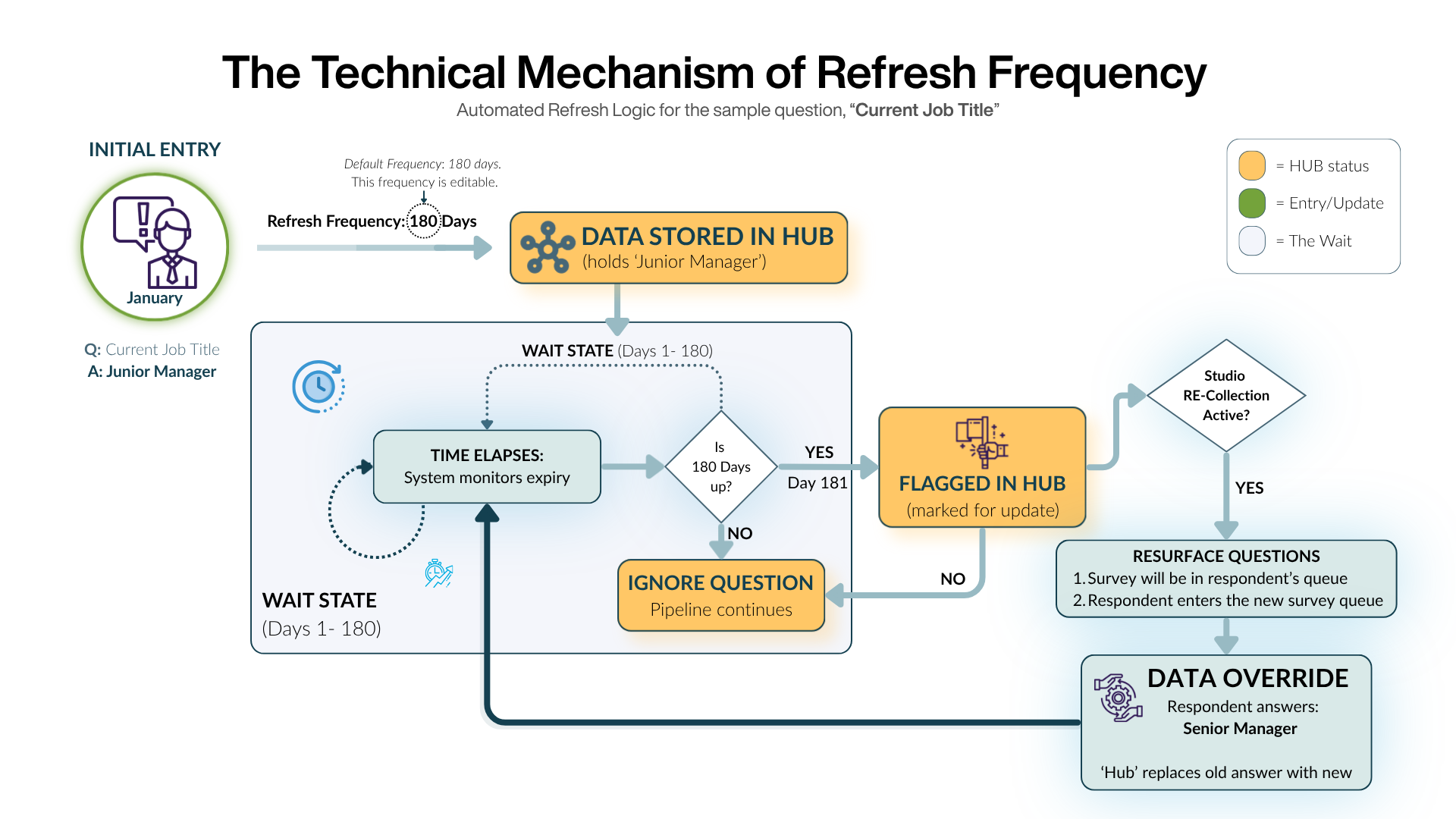
Configuration Steps
To set up this automated loop, you must configure both ends of the pipeline:
- Setting the Rules (Hub):
From the Canvas 2.0 homepage, open the Workspace containing your study, then navigate to Hub → Project Dataset Management.
Under the "Refresh Frequency" column, you can enable the function for individual variables or use the master toggle in the header for bulk activation.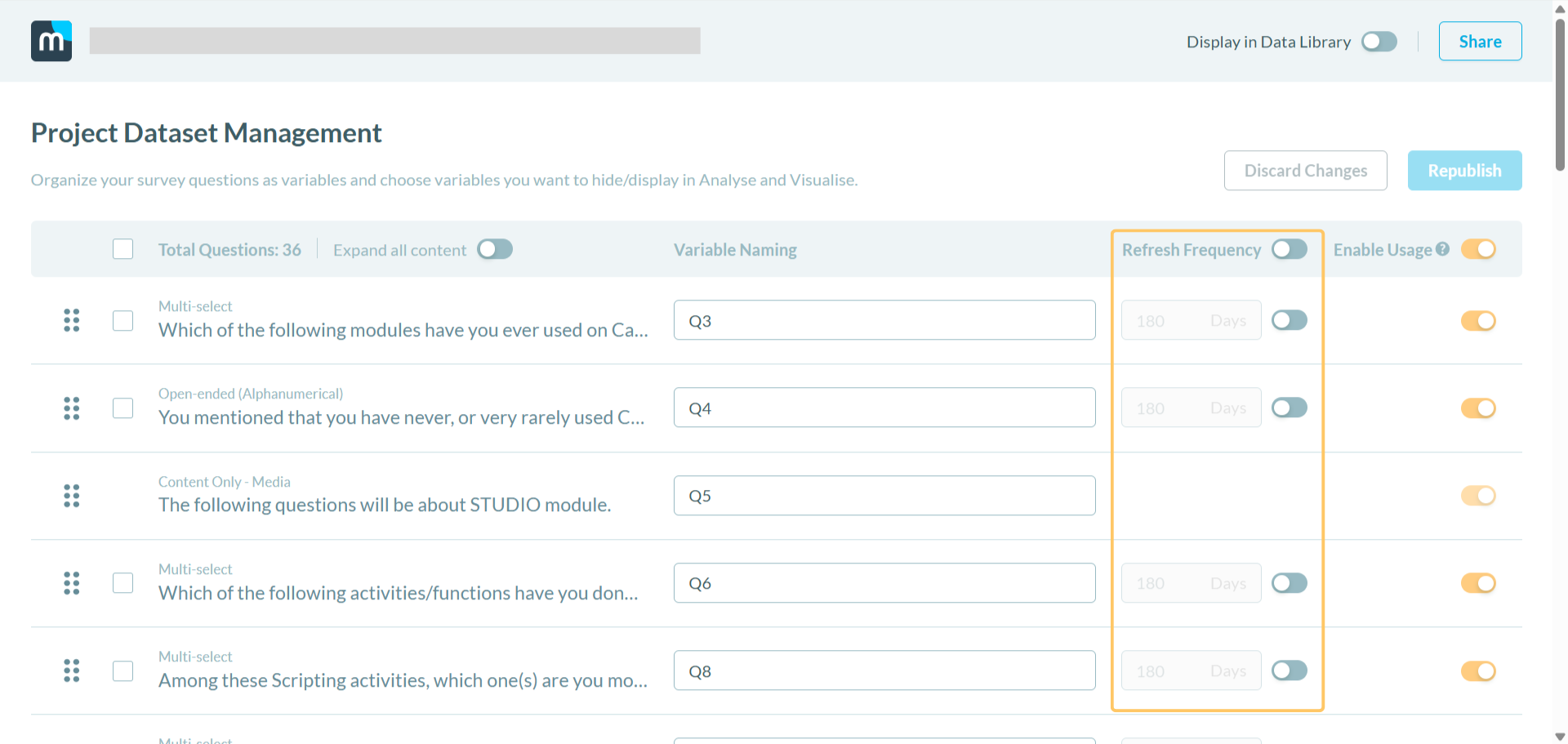 *Note on Permission: This feature is available to users with Editor access level and above. Viewers cannot modify these settings.
 - Executing the Distribution (Studio):
Open your study in Studio from the relevant Workspace, navigate to your pipeline settings, and toggle on "Re-Collection Settings."
This allows that specific pipeline to participate in the refresh cycle.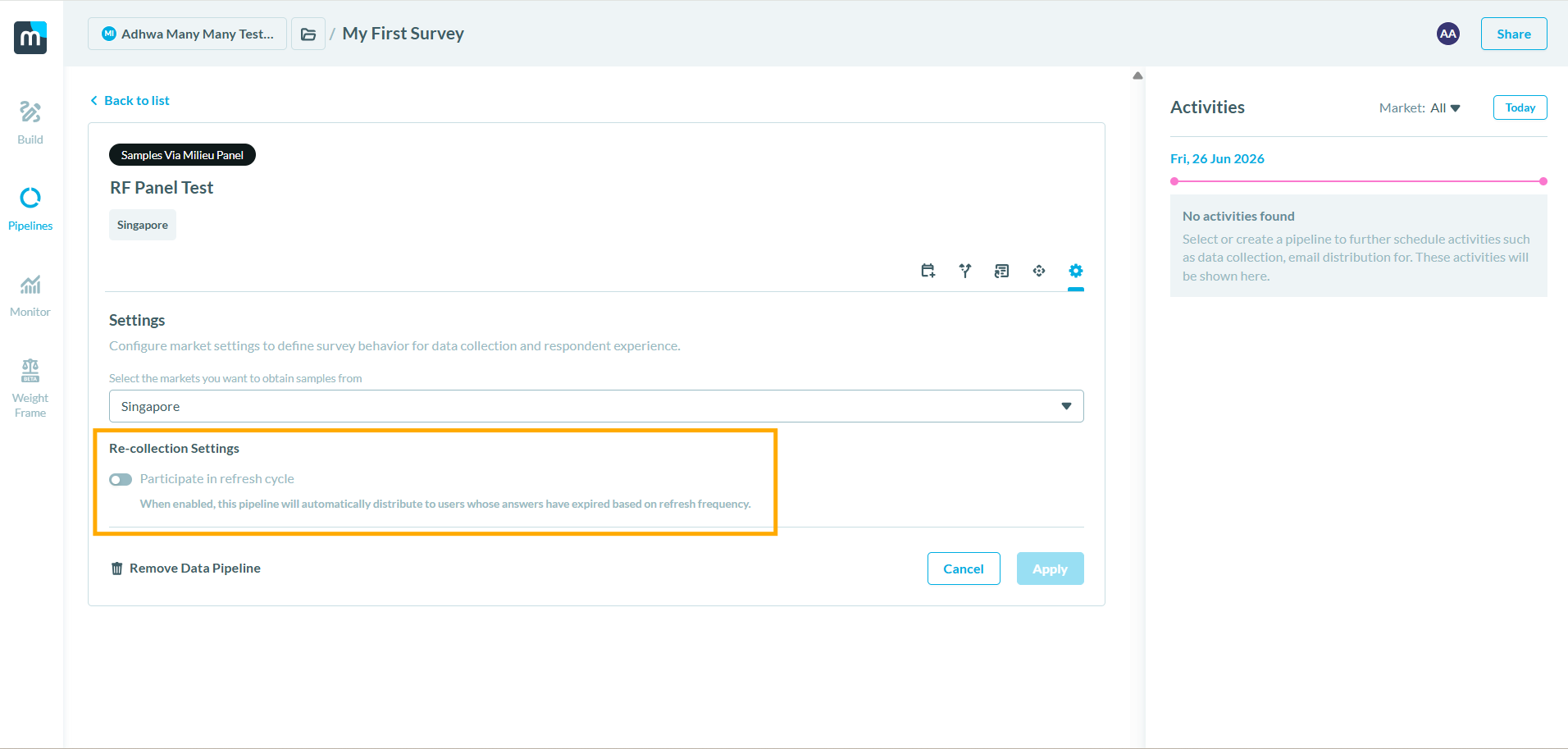
Refresh Frequency & the Data Library
If your study uses the Data Library's Main/Sub architecture, there are a few important behaviours to understand.
Refresh Frequency is tracked at the question level
Refresh Frequency is governed by a single timer per respondent, per question — not per survey or child study. This means that regardless of which pipeline or child study a respondent answers through, there is only one Refresh Frequency clock for that question. When a response is collected, it is saved to the Main dataset and the shared Refresh Frequency timer resets.
Child study Refresh Frequency settings
While Refresh Frequency can be configured at the child study level in Hub, this does not create a separate timer. The Main dataset's Refresh Frequency cadence effectively governs re-eligibility in all cases. Child-level Refresh Frequency configuration determines when that child study will flag the question for re-collection, but the underlying timer is always shared.
Practical implication
If a respondent answers a question through any child study, they will not be prompted for that question again — across any pipeline — until the Refresh Frequency period set at the Main dataset level has elapsed.
When to Use
The "When" depends on your research cycle and the nature of the data being tracked.
- 180-Day Cycle (Default): The system defaults to 180 days. This is ideal for semi-annual tracking of steady metrics like general household demographics or long-term brand awareness.
- Custom Cycles: Customize this to be shorter (e.g., 30 or 90 days) for high-volatility markets or longer for foundational "Usage and Attitude" data.
- Disabled State: Use the "Disabled" setting for data that is permanent (e.g., "In what year were you born?"). When disabled, the system simply preserves the last collected value by default.
Data Preservation Behaviour
This feature includes two important data preservation behaviours:
- Disabled state: When Refresh Frequency is disabled, the system retains the last collected value for that variable.
- Re-enabling: If the feature is turned off and later re-enabled, the last collected value remains intact, allowing tracking to resume without loss of historical data.
Best Practices & Implementation Notes
- Distribution Compatibility: Refresh Frequency is only active for Milieu Panel pipelines. If your study uses a different distribution method, this feature will not apply.
- No Respondent Notifications: It is important to note that respondents are not notified when they become eligible for a refresh. They simply become eligible to re-enter the survey flow through your standard distribution channels.
- The Master Toggle: Use bulk-enable in Hub’s table header carefully; ensure all variables in that dataset actually require the same update cadence.
- Pipeline Sync: Remember that even if Hub rules are set, updated responses will not be collected unless Re-Collection Settings are active in the Studio pipeline. Both "gears" must be turning for the system to work.
- Interaction with Survey Waves: Refresh Frequency operates independently of survey waves. A question will only be shown again if its refresh period has expired, regardless of how many waves the user participates in.
Was this article helpful?
That’s Great!
Thank you for your feedback
Sorry! We couldn't be helpful
Thank you for your feedback
Feedback sent
We appreciate your effort and will try to fix the article