TABLE OF CONTENTS
- Overview
- Core Concept: The Main-Sub Architecture
- Key Operational Features
- Technical Requirements & Constraints
Overview
The Data Library (formerly Question Library) is a specialised data management architecture within Canvas 2.0. It serves as a central storage hub for standardised variables, ensuring that data collected across different surveys stays consistent and can be tracked and compared over time.
Unlike standard survey questions, which exist in isolation, questions in the Data Library can be used across various surveys, depending on needs of the user.
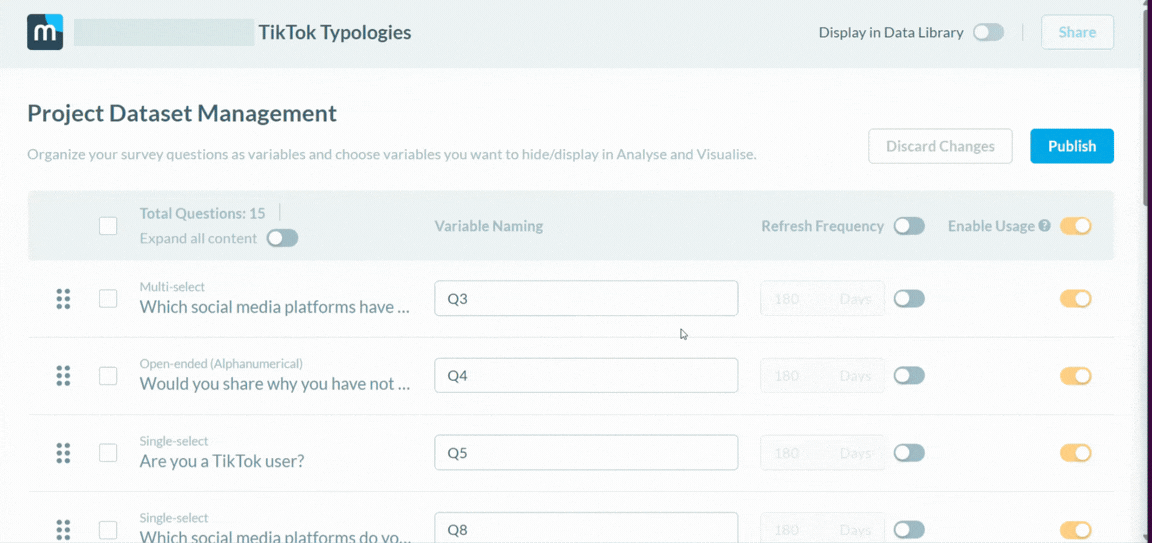 Method of activating Data Library: Toggle the "Display in Data Library" button on
Core Concept: The Main-Sub Architecture
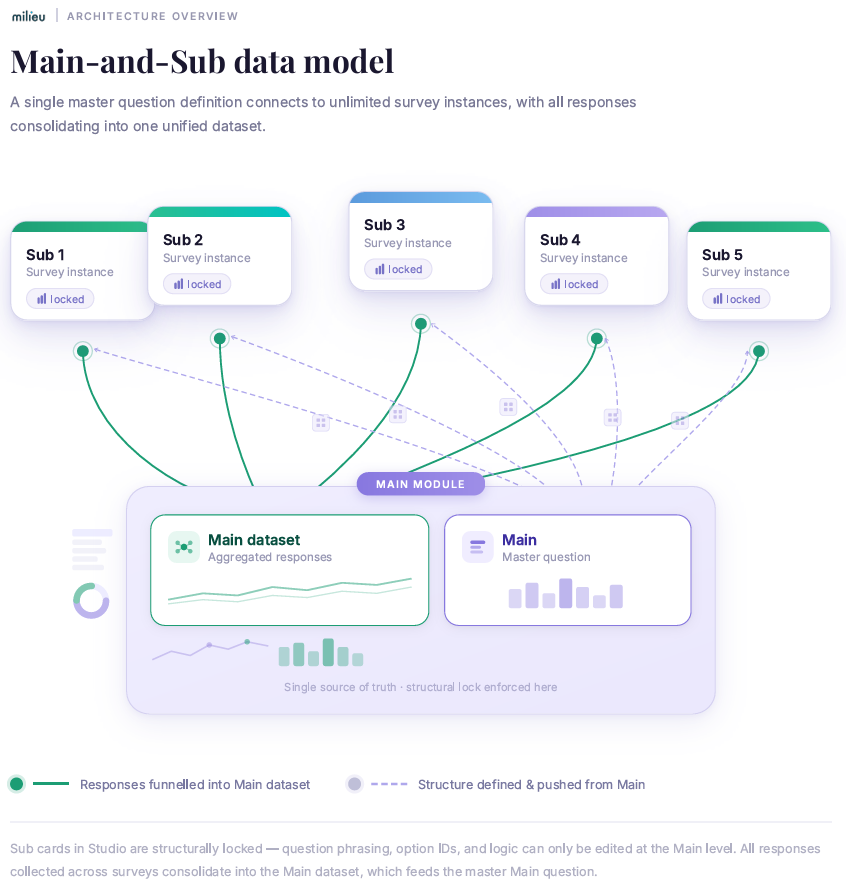
The system utilises a strict hierarchy to maintain data integrity across multiple touchpoints.
1. Main (The Source)
A "Main" is the master version of a question configured in Hub. It serves as the single point of truth for a particular main-sub set. Any structural attributes - such as question phrasing, option IDs, and logic - are defined here.
2. Sub (The Instance)
When a library question is added to a survey in Studio, it is treated as a "Sub" card.
- Data Flow: Responses collected through a Sub card do not only stay siloed within that specific survey; they are automatically funneled back to the Main dataset.
- Structural Lock: To prevent data misalignment, Sub cards are fixed. You cannot modify text or options at the survey level. All structural changes must occur at the Main level to ensure every "Sub" instance remains identical.
Data Library (Visual Editor): How Sub cards are added to the study by Milieu Strategic Enablement
Key Operational Features
Automated Data Recognition (Skip Logic)
The Data Library tracks respondent history. If a respondent has already provided an answer to a library question in a previous study - and that data is still within its validity period - the system will automatically bypass that question and will not be asked to the respondent again, increasing LOI efficiency.
Targeted Audience Filtering
Data Library variables can be used as criteria for survey entry. For example, if a "Main" variable identifies a specific user attribute (e.g., "Subscription Tier: Gold"), you can configure subsequent surveys to only trigger for respondents who meet that stored criteria.
For more information, please refer to this article.
External Data Conversion
The system allows for the ingestion of external data sources of compatible formats. Once imported into Canvas 2.0, this data can be converted into a standardized survey question format and added to the Data Library for recurring use in research cycles.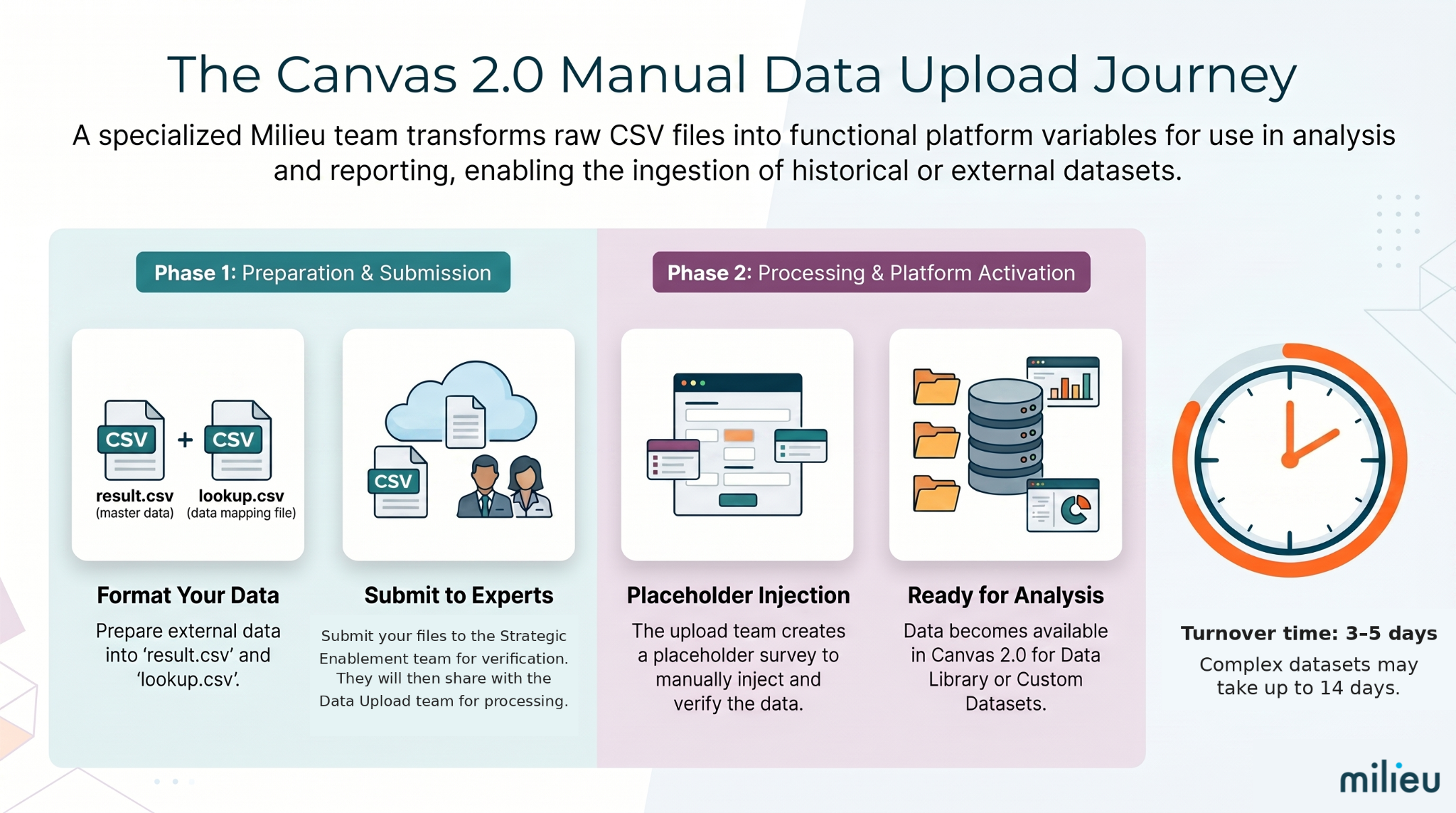
For more information, please refer to this article.
Technical Requirements & Constraints
- Permissions: Managing the library requires Dataset Editor or Dataset Viewer permissions within Hub module.
- Publication State: A dataset must be Published before its variables can be toggled for use in the Data Library.
- Reuse Restrictions: To protect the accuracy of sample counts, a Sub question cannot be used as a source for another survey; it must always link back to the original Main.
Was this article helpful?
That’s Great!
Thank you for your feedback
Sorry! We couldn't be helpful
Thank you for your feedback
Feedback sent
We appreciate your effort and will try to fix the article