The Data Library is not limited to data captured within the Canvas 2.0 ecosystem. It also functions as a powerful ingestion engine for external datasets—such as XLS exports or legacy research. By importing this data and converting it into a standardised survey format, you can leverage historical insights to drive real-time survey logic.
However, the utility of this data depends heavily on how it is linked to your respondents.
TABLE OF CONTENTS
- The Identity Anchor: Storage ID & Profile ID
- Ingestion Protocol & Internal Workflow
- Limitations: Datasets Without Storage IDs
- What Can Be Done Without Storage IDs?
- Ingestion and Conversion Workflow
The Identity Anchor: Storage ID & Profile ID
To use external data effectively with Milieu native panels, the system requires a "primary key" to match external records to specific respondents. This is the Storage ID (or Profile ID).
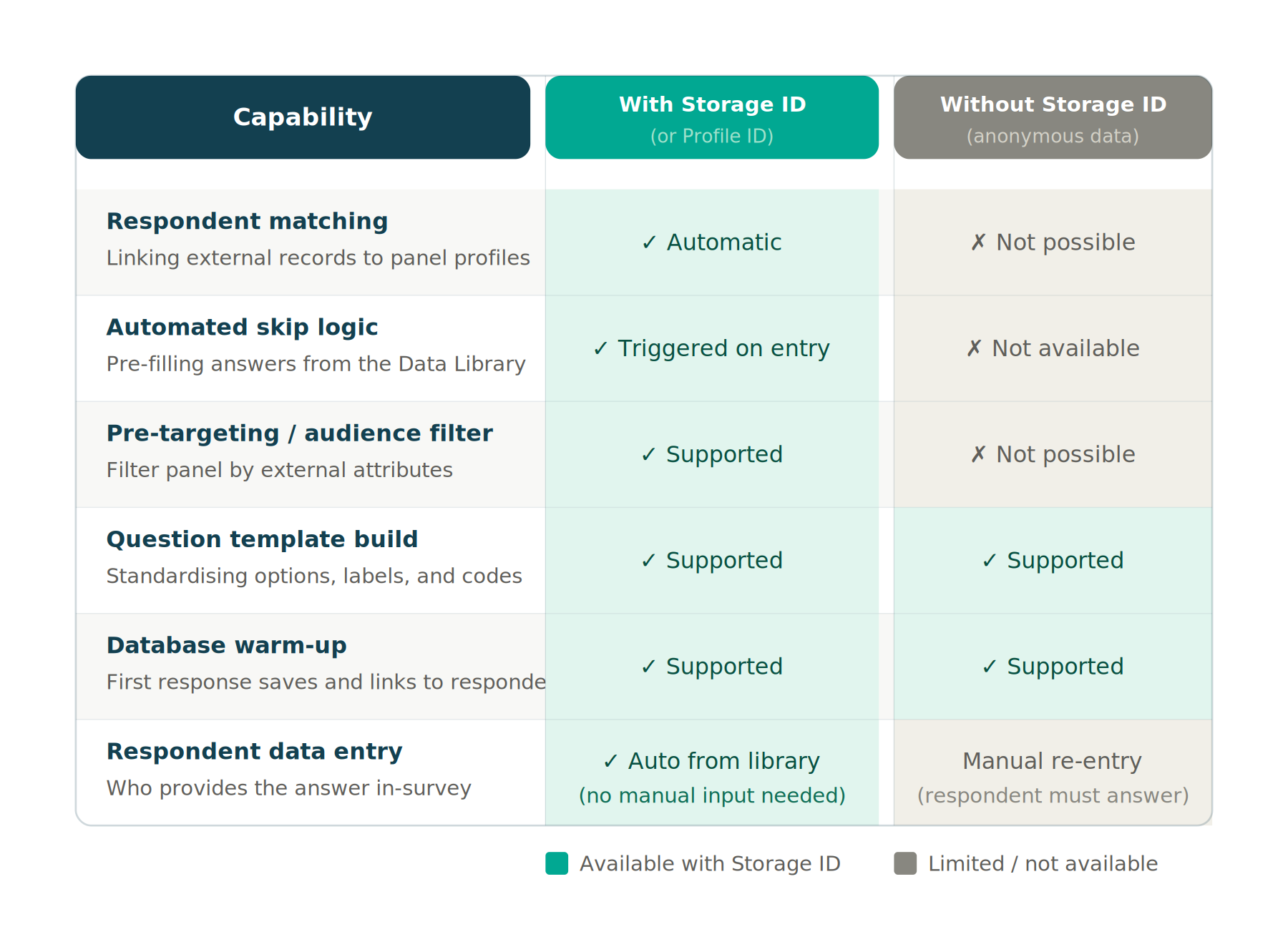
Without this ID, the data remains anonymous and cannot be "linked" to a respondent when they enter a survey. When the Storage ID is present, Hub maps external attributes (e.g., "Subscription Tier") directly to the respondent's profile, allowing the Data Library to "recognise" them instantly and trigger automated skip logic.
Ingestion Protocol & Internal Workflow
Because the Data Library acts as a "Source of Truth" for the entire organization, the ingestion of external data is a governed process. Users cannot directly upload external .xls to Studio for editing nor Hub for processing; instead, they must follow the internal request pipeline:
The Request Process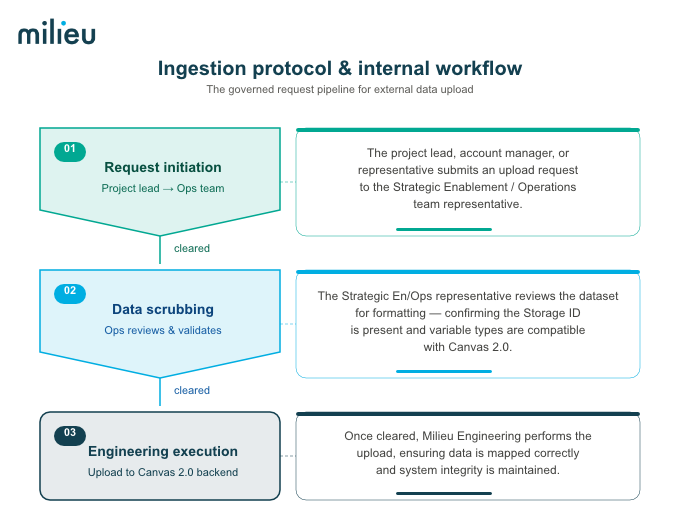
- Request Initiation: The project lead, account manager or representative must submit an upload request to the Strategic Enablement/Operations team representative.
- Data Scrubbing: The Strategic Ops team representative reviews the dataset for formatting, ensuring the Storage ID is present and the variable types are compatible with Canvas 2.0.
- Engineering Execution: Once cleared, a Milieu Engineering team representative performs the actual upload into the Canvas 2.0 backend. This ensures the data is mapped correctly and system integrity is maintained.
Lead Time and Planning
Due to the multi-departmental review and technical mapping required, the standard lead time for a data ingestion request is 5–10 business days. Project leads should factor this window into their field schedules to ensure the Data Library is "warmed up" before a survey goes live.
Limitations: Datasets Without Storage IDs
If a client provides a dataset without Milieu Storage IDs, the Data Library cannot perform a background "handshake" to identify the respondent. This leads to several technical limitations:
- No Automated Skip Logic: The system cannot "pre-fill" answers because it doesn't know which row of data belongs to the person taking the survey.
- No Pre-Targeting: You cannot filter a native panel audience based on external attributes (e.g., "Target only User #505") because the system cannot verify who User #505 is within the panel.
- Manual Re-entry: The data can still exist in the library, but the respondent will likely have to manually answer the question to "claim" that data point for their profile moving forward.
What Can Be Done Without Storage IDs?
Even without a unique ID, external datasets still provide value within the Canvas 2.0 ecosystem through Manual Mapping and Template Standardisation:
- Standardised Question Templates: You can use the external data to quickly build the "Main" question structure (options, labels, and codes). This ensures that even if you have to ask the question, the format perfectly matches the client's internal database for easier post-survey merging.
- Database "Warm-up": You can host the questions in the Data Library so that the first time a respondent answers them in a Canvas survey, their response is saved. For all future surveys, that data point is now "known" and linked to their ID for that organisation.
Ingestion and Conversion Workflow
- Data Preparation (The Excel, .xls with result & lookup tab)
Your external file must be formatted as an .xls (excel) file. If targeting native panels, the Storage ID is the most critical column. If the ID is missing, the file should at least contain the variables and option labels you wish to standardise. - The Ingestion Process
- Data Upload: Performed by the Milieu Engineering team representative upon upload sign-off from Strategic Enablement.
- Mapping: External columns are mapped to their corresponding variable types (e.g., a "Yes/No" column in your excel file becomes a Single Choice question if stated in the lookup).
*Note: See attachment to download sample export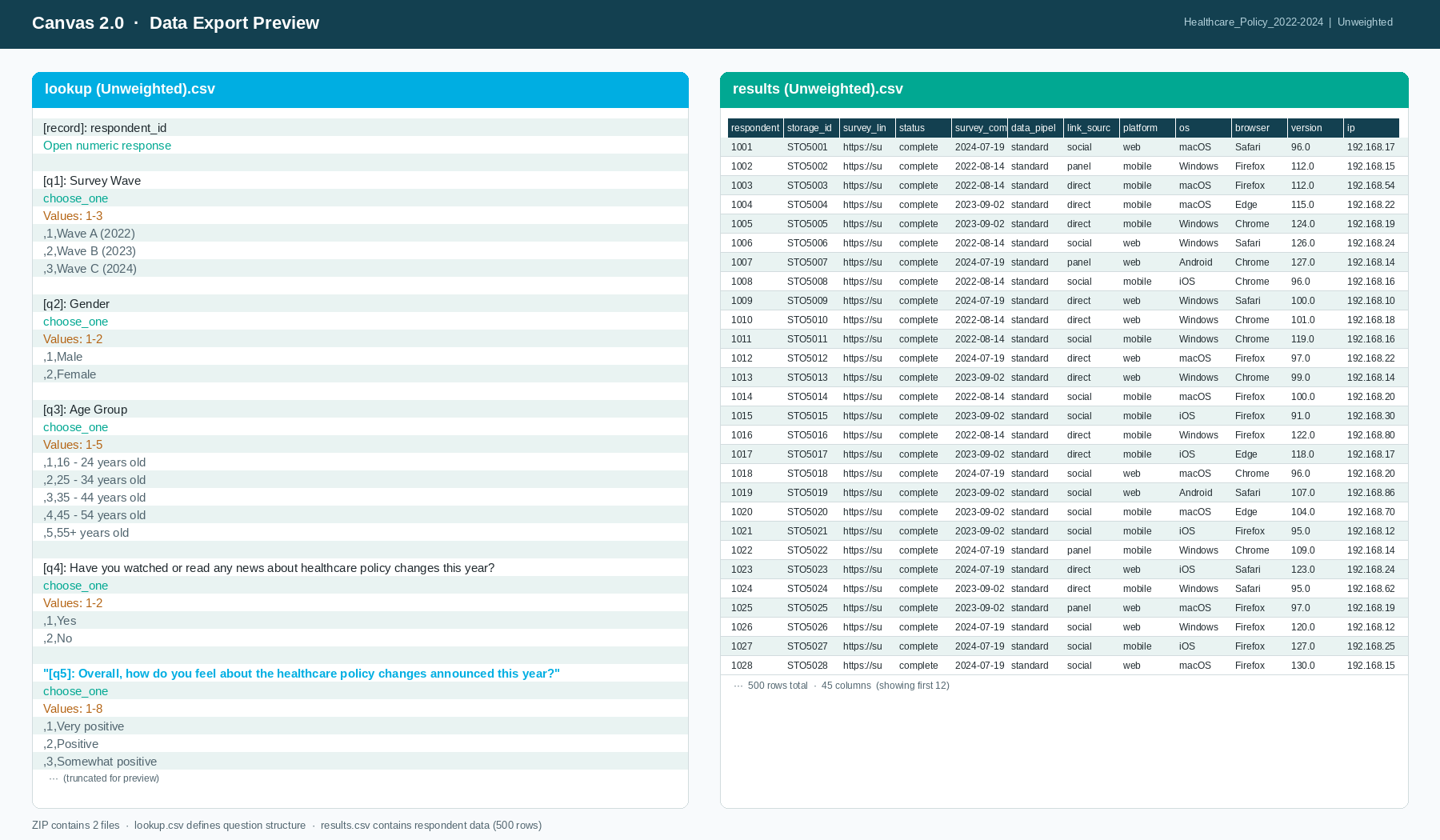
- Validation: For native panels, the system validates the Storage IDs. Only records with a confirmed ID match will be active for automated features.
- Activation
Once the dataset is published and the "Display in Data Library" toggle is enabled, these data points become "Main" questions available to be dropped into any Studio project as "Sub" cards.
Starting June 2026, resources are organised within Workspaces. Note that the Data Library operates at the organisation level — users with Data Library access can extract and use published data points in Analyse or Visualise regardless of Workspace access. However, viewing or editing the source dataset directly in Hub requires access to the Workspace it belongs to.
Was this article helpful?
That’s Great!
Thank you for your feedback
Sorry! We couldn't be helpful
Thank you for your feedback
Feedback sent
We appreciate your effort and will try to fix the article